
FBR Mein Register Kaise Karein? NTN, STRN aur IRIS Portal Complete Guide
Before you can start FBR Digital Invoicing or FBR Retail POS, there's a step that comes first — and it trips up more businesses than the invoicing itself: getting properly registered with FBR. If you're not sure what NTN, STRN, or the IRIS portal actually mean for your business, this guide walks through it step by step.
The Three Terms You Need to Know
NTN (National Tax Number) This is your business's tax identity number, issued once you register with FBR. Every registered business needs one — it's the foundation everything else builds on.
STRN (Sales Tax Registration Number) If your business is required to charge and collect sales tax (which most manufacturers, wholesalers, and many retailers are), you also need an STRN. Not every business needs this — it depends on your turnover and sector — but if you're planning to do FBR Digital Invoicing or Retail POS, you almost certainly need one.
IRIS Portal IRIS (https://iris.fbr.gov.pk) is FBR's official online portal where registration, tax filing, and account management happen. This is where your NTN and STRN applications get processed, and where you'll manage your account going forward.
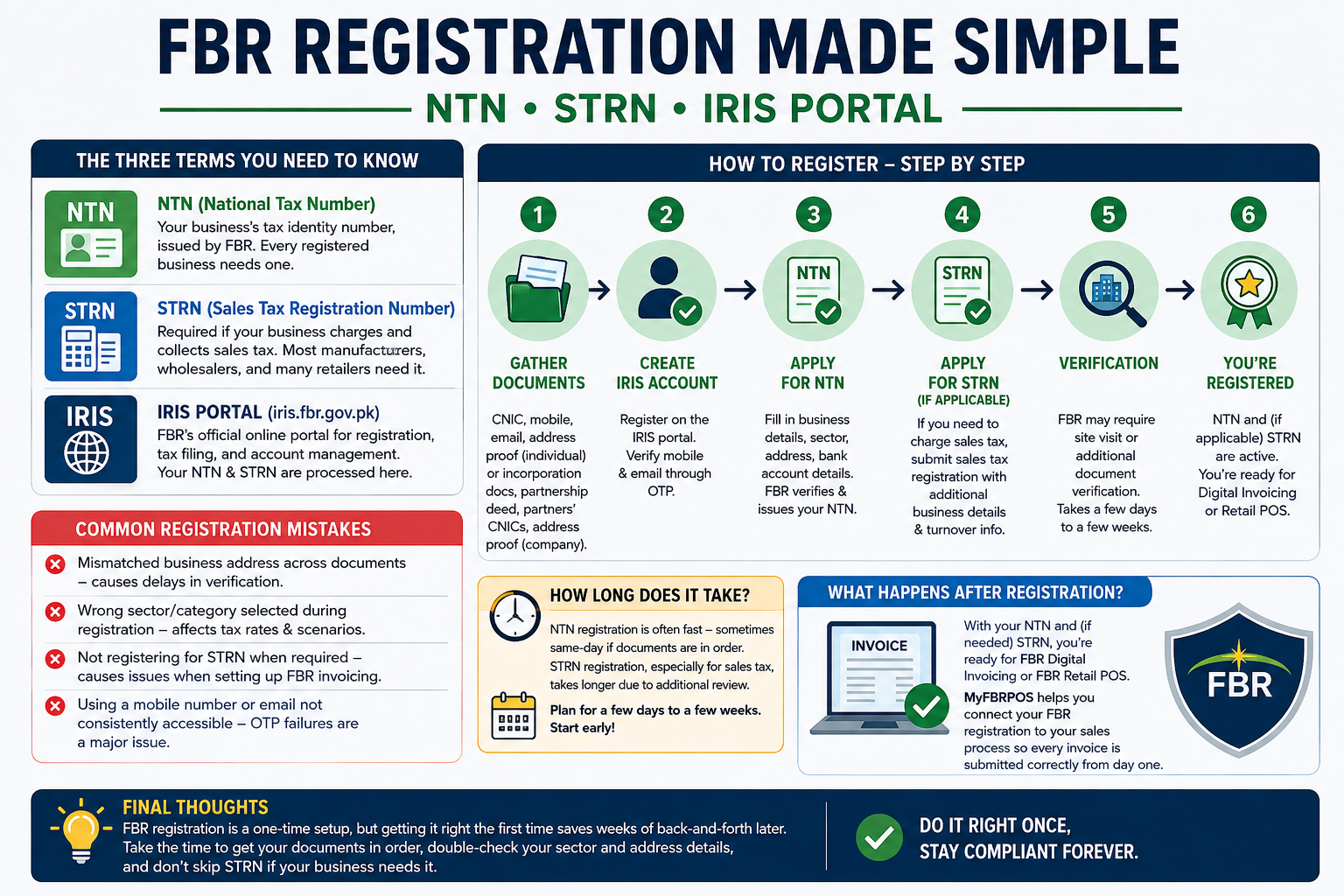
Step-by-Step: How to Register
1. Gather your documents For an individual/sole proprietor: CNIC, mobile number registered in your name, active email address, and proof of business address (utility bill or rent agreement). For a company/partnership: incorporation certificate, partnership deed (if applicable), CNICs of all partners/directors, and business address proof.
2. Create your IRIS account Go to the IRIS portal and register as a new taxpayer. You'll verify your mobile number and email through OTP codes.
3. Apply for NTN Fill in your business details — nature of business, sector, address, bank account details. Once submitted and verified, FBR issues your NTN.
4. Apply for STRN (if applicable) If your business needs to charge sales tax, you'll file a separate sales tax registration application within IRIS, providing additional details about your business activity and expected turnover.
5. Verification FBR may require a site visit or additional document verification, especially for sales tax registration. This step can take anywhere from a few days to a few weeks depending on your case.
6. You're registered Once approved, your NTN and STRN are active, and you can move on to setting up Digital Invoicing or Retail POS.
Common Registration Mistakes
Mismatched business address across documents — causes delays in verification
Wrong sector/category selected during registration — this affects which tax rates and scenarios apply to you later
Not registering for STRN when required — some businesses get NTN but skip STRN, then run into problems when they try to set up FBR invoicing
Using a mobile number or email not consistently accessible — OTP verification failures are one of the most common support issues
How Long Does It Take?
NTN registration itself is often fast — sometimes same-day if your documents are in order. STRN registration, especially for sales tax, can take longer since it may involve additional review. Plan for anywhere from a few days to a few weeks, and start this process well before you need to go live with invoicing.
What Happens After Registration?
Once you have your NTN and (if needed) STRN, you're ready for the next step: setting up FBR Digital Invoicing or FBR Retail POS, depending on your business type. This is where software like MyFBRPOS comes in — once your FBR registration is active, we help you connect it to your actual sales process so every invoice is submitted correctly from day one.
[IMAGE 2 — Diagram: Simple step flow: "Gather Documents → Create IRIS Account → Apply NTN → Apply STRN → Verification → Registered". Alt text: "FBR registration process step by step diagram"]
Final Thoughts
FBR registration is a one-time setup process, but getting it right the first time saves weeks of back-and-forth later. Take the time to get your documents in order, double-check your sector and address details, and don't skip STRN if your business actually needs it. Once registration is done, the rest of your FBR compliance journey — invoicing, POS, reporting — becomes far easier to set up correctly.
FBR میں رجسٹر کیسے کریں؟ NTN، STRN اور IRIS پورٹل کی مکمل گائیڈ
FBR ڈیجیٹل انوائسنگ یا FBR ریٹیل POS شروع کرنے سے پہلے، ایک قدم ایسا ہے جو پہلے آتا ہے — اور یہ انوائسنگ سے بھی زیادہ کاروباروں کو الجھن میں ڈالتا ہے: FBR کے ساتھ صحیح طریقے سے رجسٹر ہونا۔ اگر آپ کو یقین نہیں کہ NTN، STRN، یا IRIS پورٹل کا آپ کے کاروبار کے لیے اصل مطلب کیا ہے، تو یہ گائیڈ قدم بہ قدم سمجھائے گی۔
تین اہم اصطلاحات جو آپ کو معلوم ہونی چاہییں
NTN (National Tax Number) یہ آپ کے کاروبار کا ٹیکس شناختی نمبر ہے، جو FBR کے ساتھ رجسٹر ہونے پر جاری ہوتا ہے۔ ہر رجسٹرڈ کاروبار کو اس کی ضرورت ہوتی ہے — باقی سب چیزیں اسی پر بنتی ہیں۔
STRN (Sales Tax Registration Number) اگر آپ کے کاروبار کو sales tax وصول کرنا لازمی ہے (جو زیادہ تر مینوفیکچررز، ہول سیلرز، اور بہت سے ریٹیلرز کے لیے ہوتا ہے)، تو آپ کو STRN بھی چاہیے۔ ہر کاروبار کو اس کی ضرورت نہیں ہوتی — یہ آپ کے turnover اور sector پر منحصر ہے — لیکن اگر آپ FBR ڈیجیٹل انوائسنگ یا ریٹیل POS کرنے کا سوچ رہے ہیں، تو تقریباً یقینی طور پر آپ کو اس کی ضرورت ہوگی۔
IRIS پورٹل IRIS (https://iris.fbr.gov.pk) FBR کا آفیشل آن لائن پورٹل ہے جہاں رجسٹریشن، ٹیکس فائلنگ، اور اکاؤنٹ مینجمنٹ ہوتی ہے۔ یہیں آپ کی NTN اور STRN درخواستیں process ہوتی ہیں۔
قدم بہ قدم: رجسٹریشن کیسے کریں
1. اپنے دستاویزات جمع کریں انفرادی/sole proprietor کے لیے: CNIC، اپنے نام پر رجسٹرڈ موبائل نمبر، فعال ای میل ایڈریس، اور کاروباری پتے کا ثبوت (utility bill یا rent agreement)۔ کمپنی/پارٹنرشپ کے لیے: incorporation certificate، partnership deed (اگر لاگو ہو)، تمام پارٹنرز/ڈائریکٹرز کے CNICs، اور کاروباری پتے کا ثبوت۔
2. اپنا IRIS اکاؤنٹ بنائیں IRIS پورٹل پر جائیں اور نئے taxpayer کے طور پر رجسٹر ہوں۔ آپ اپنا موبائل نمبر اور ای میل OTP کوڈز کے ذریعے verify کریں گے۔
3. NTN کے لیے apply کریں اپنی کاروباری تفصیلات بھریں — کاروبار کی نوعیت، sector، پتہ، بینک اکاؤنٹ کی تفصیلات۔ submit اور verify ہونے کے بعد، FBR آپ کا NTN جاری کرتا ہے۔
4. STRN کے لیے apply کریں (اگر لاگو ہو) اگر آپ کے کاروبار کو sales tax وصول کرنا ہے، تو آپ IRIS میں الگ سے sales tax registration کی درخواست دیں گے۔
5. تصدیق FBR کو site visit یا اضافی document verification کی ضرورت ہو سکتی ہے، خاص طور پر sales tax رجسٹریشن کے لیے۔ یہ قدم چند دنوں سے چند ہفتوں تک لے سکتا ہے۔
6. آپ رجسٹرڈ ہو چکے منظوری کے بعد، آپ کا NTN اور STRN فعال ہو جاتے ہیں، اور آپ Digital Invoicing یا Retail POS سیٹ اپ کرنے کی طرف بڑھ سکتے ہیں۔
عام رجسٹریشن غلطیاں
مختلف دستاویزات میں پتے کا میل نہ کھانا — verification میں تاخیر کا باعث بنتا ہے
رجسٹریشن کے دوران غلط sector/category چننا — یہ بعد میں آپ پر لاگو ہونے والے ٹیکس ریٹس اور scenarios کو متاثر کرتا ہے
ضرورت ہونے پر بھی STRN کے لیے رجسٹر نہ کرنا
رجسٹریشن کے بعد کیا ہوتا ہے؟
ایک بار آپ کے پاس NTN اور (اگر ضرورت ہو) STRN آ جائے، تو آپ اگلے قدم کے لیے تیار ہیں: اپنے کاروبار کی نوعیت کے مطابق FBR ڈیجیٹل انوائسنگ یا FBR ریٹیل POS سیٹ اپ کرنا۔ یہیں MyFBRPOS جیسا سافٹ ویئر کام آتا ہے — ایک بار آپ کی FBR رجسٹریشن فعال ہو جائے، ہم اسے آپ کے اصل sales process سے جوڑنے میں مدد کرتے ہیں تاکہ ہر انوائس پہلے دن سے صحیح طریقے سے submit ہو۔
آخری بات
FBR رجسٹریشن ایک بار کا setup process ہے، مگر پہلی بار صحیح طریقے سے کرنا آپ کو بعد میں ہفتوں کی مشکلات سے بچاتا ہے۔ اپنے دستاویزات ترتیب میں رکھیں، sector اور پتے کی تفصیلات دوبارہ چیک کریں، اور اگر آپ کے کاروبار کو STRN کی ضرورت ہے تو اسے مت چھوڑیں۔