
FBR Digital Invoicing Kya Hai? Complete Guide for Pakistani Businesses (2026)
FBR Digital Invoicing Kya Hai? Complete Guide for Pakistani Businesses (2026)
If you run a manufacturing, import/export, distribution, or wholesale business in Pakistan, you've probably heard the term FBR Digital Invoicing — and maybe felt a little confused about what it actually means for you. This guide breaks it down in plain language: what it is, why FBR introduced it, who needs it, and how it actually works day-to-day.
What Is FBR Digital Invoicing?
FBR Digital Invoicing (often shortened to DI) is a system introduced by the Federal Board of Revenue that requires certain businesses to submit their sales invoices electronically, in real time, directly to FBR's servers — instead of just keeping paper or PDF records.
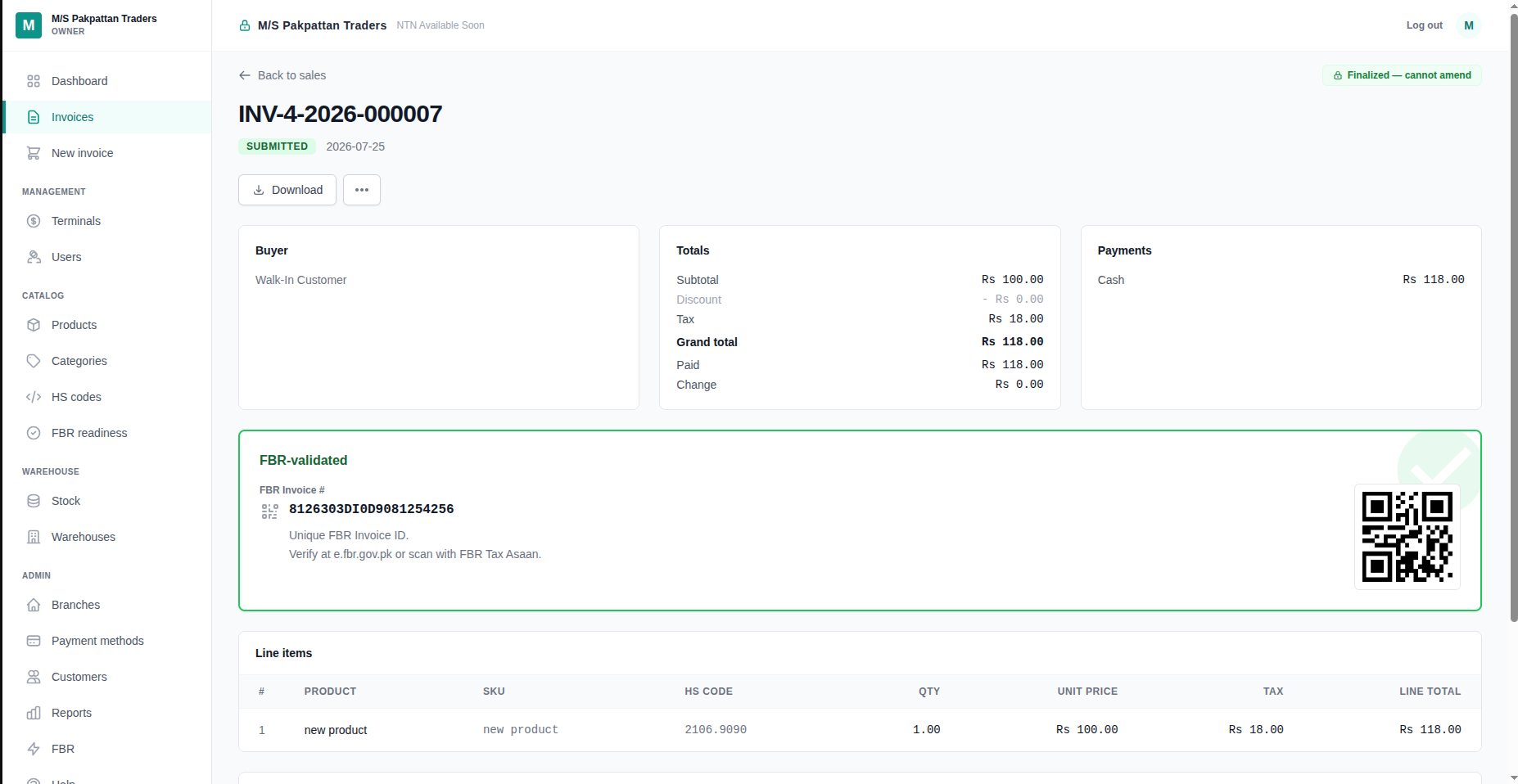
Every time you make a qualifying sale, your invoice data (buyer details, tax amount, HS code, price, and more) gets sent through PRAL's (Pakistan Revenue Automation Limited) API straight to FBR. In return, FBR issues an official invoice number and often a QR code that proves the transaction is officially recorded.
In short: no more manually typing invoices into the IRIS portal at month-end. The moment you make a sale, it's already reported.
Why Did FBR Introduce This?
A few core reasons:
Reducing tax evasion — under-reporting sales was common when invoicing was manual and disconnected from FBR's systems
Real-time visibility — FBR gets sales data as it happens, not weeks or months later
Standardizing invoices — every invoice follows the same structured format, making audits and reconciliation easier
Reducing paperwork for compliant businesses — once set up correctly, the process is largely automatic
Who Actually Needs FBR Digital Invoicing?
This mainly applies to:
Manufacturers
Importers
Exporters
Distributors and wholesalers
This is different from FBR Retail POS, which is a separate (though related) system aimed at retailers and shopkeepers selling directly to end consumers. If you're a manufacturer selling to other registered businesses, DI is your system. If you're a shop selling to walk-in customers, you likely need Retail POS instead — we cover that difference in a separate guide.
How Does It Actually Work?
Here's the simplified flow:
You make a sale and generate an invoice in your system
Your invoicing software builds a structured JSON payload with all required fields — buyer NTN/CNIC, HS code, tax rate, scenario ID, and more
This payload is sent to PRAL's DI API
FBR validates it and, if accepted, returns a unique FBR invoice number (e.g.
7000007DI1747119701593)A QR code is generated, tied to that invoice
Your final invoice — PDF or printed — includes this FBR number and QR code, proving it was officially reported
If any of this sounds technical, that's because it is — which is exactly why most businesses use software built specifically for this, rather than trying to call FBR's API manually.
What Information Does an Invoice Need?
A few of the key fields FBR requires:
HS Code (Harmonized System code) — identifies the exact type of goods
Buyer NTN or CNIC — depending on whether the buyer is a registered business or individual
Scenario ID — FBR defines around 28 different sale scenarios (standard rate, reduced rate, exempt goods, zero-rated exports, and more), and your invoice needs to match the correct one
Tax rate — 0%, 5%, 17%, 18%, or other applicable rates
SRO Schedule details — for goods under special regulatory orders
Getting any of these wrong is one of the most common reasons invoices get rejected by FBR — which is why automated, tested systems matter.
Common Mistakes Businesses Make
Manually re-entering data that's already in their existing systems, doubling the work
Choosing the wrong scenario ID for their type of sale
Missing or incorrect HS/PCT codes on products
Not tracking which invoices succeeded vs. failed — leading to compliance gaps that surface only during an audit
How MyFBRPOS Simplifies This
This is exactly the gap MyFBRPOS is built to close. Instead of manually handling PRAL's API, MyFBRPOS automates the entire flow:
Every sale automatically triggers a background submission to FBR — no manual steps
The system determines the correct scenario ID for you
HS codes and PCT codes sync automatically with your product catalog
Every invoice shows a clear status: pending, validated, success, or failed — so nothing slips through unnoticed
You get both a professional A4 PDF invoice and an 80mm thermal receipt, each carrying the FBR invoice number and QR code
Whether you're a manufacturer needing full Digital Invoicing or a retailer needing FBR POS, the underlying compliance engine is the same — built once, tested against FBR's sandbox, and running in production today.
Final Thoughts
FBR Digital Invoicing isn't just a compliance requirement — done right, it removes a huge amount of manual admin work from your business. The businesses struggling with it are almost always the ones trying to handle FBR's API by hand. The ones that aren't struggling are running it through purpose-built software that handles the technical complexity for them.
FBR ڈیجیٹل انوائسنگ کیا ہے؟ پاکستانی کاروباروں کے لیے مکمل گائیڈ (2026)
اگر آپ پاکستان میں مینوفیکچرنگ، امپورٹ/ایکسپورٹ، ڈسٹری بیوشن یا ہول سیل کا کاروبار چلاتے ہیں، تو آپ نے FBR ڈیجیٹل انوائسنگ کا نام ضرور سنا ہوگا — اور شاید یہ سمجھنے میں تھوڑی مشکل ہوئی ہو کہ اس کا اصل مطلب کیا ہے۔ یہ گائیڈ آسان زبان میں سمجھاتی ہے: یہ کیا ہے، FBR نے اسے کیوں شروع کیا، کن کاروباروں کو اس کی ضرورت ہے، اور یہ عملی طور پر کیسے کام کرتا ہے۔
FBR ڈیجیٹل انوائسنگ کیا ہے؟
FBR ڈیجیٹل انوائسنگ (اکثر DI کہا جاتا ہے) ایک ایسا نظام ہے جو فیڈرل بورڈ آف ریونیو نے متعارف کروایا ہے، جس کے تحت کچھ کاروباروں کو اپنے سیلز انوائسز الیکٹرانک طریقے سے، ریئل ٹائم میں، براہِ راست FBR کے سرورز کو بھیجنا ہوتے ہیں — نہ کہ صرف کاغذی یا PDF ریکارڈ رکھنا۔
جب بھی آپ کوئی sale کرتے ہیں، آپ کے انوائس کی تفصیلات (خریدار کی معلومات، ٹیکس کی رقم، HS کوڈ، قیمت وغیرہ) PRAL (Pakistan Revenue Automation Limited) کے API کے ذریعے براہِ راست FBR کو بھیجی جاتی ہیں۔ اس کے بدلے میں، FBR ایک آفیشل انوائس نمبر اور اکثر ایک QR کوڈ جاری کرتا ہے جو ثابت کرتا ہے کہ یہ transaction باقاعدہ طور پر ریکارڈ ہو چکی ہے۔
مختصر یہ کہ: مہینے کے آخر میں IRIS پورٹل میں دستی طور پر انوائسز ٹائپ کرنے کی ضرورت نہیں رہتی۔ جیسے ہی sale ہوتی ہے، وہ پہلے سے ہی رپورٹ ہو چکی ہوتی ہے۔
FBR نے یہ نظام کیوں متعارف کروایا؟
چند بنیادی وجوہات:
ٹیکس چوری میں کمی — جب انوائسنگ دستی اور FBR کے نظام سے الگ تھی تو sales کم دکھانا عام تھا
ریئل ٹائم معلومات — FBR کو sales کا ڈیٹا فوری طور پر ملتا ہے، ہفتوں یا مہینوں بعد نہیں
انوائسز کا معیاری ہونا — ہر انوائس ایک جیسے ڈھانچے میں ہوتا ہے، جس سے آڈٹ اور reconciliation آسان ہو جاتی ہے
کمپلائنٹ کاروباروں کے لیے کاغذی کارروائی میں کمی — ایک بار صحیح طریقے سے سیٹ اپ ہو جائے تو یہ عمل زیادہ تر خودکار ہو جاتا ہے
اصل میں کن کاروباروں کو FBR ڈیجیٹل انوائسنگ کی ضرورت ہے؟
یہ بنیادی طور پر ان پر لاگو ہوتا ہے:
مینوفیکچررز
امپورٹرز
ایکسپورٹرز
ڈسٹری بیوٹرز اور ہول سیلرز
یہ FBR ریٹیل POS سے مختلف ہے، جو ایک الگ (مگر متعلقہ) نظام ہے جو ریٹیلرز اور دکانداروں کے لیے ہے جو براہِ راست end consumers کو بیچتے ہیں۔ اگر آپ مینوفیکچرر ہیں اور دوسرے رجسٹرڈ کاروباروں کو بیچتے ہیں، تو DI آپ کا نظام ہے۔ اگر آپ کی دکان walk-in customers کو بیچتی ہے، تو آپ کو غالباً Retail POS کی ضرورت ہوگی — اس فرق پر ہم ایک الگ گائیڈ میں بات کریں گے۔
یہ عملی طور پر کیسے کام کرتا ہے؟
یہاں سادہ سا process ہے:
آپ sale کرتے ہیں اور اپنے سسٹم میں انوائس بناتے ہیں
آپ کا انوائسنگ سافٹ ویئر تمام ضروری معلومات کے ساتھ ایک structured JSON payload بناتا ہے — خریدار کا NTN/CNIC، HS کوڈ، ٹیکس ریٹ، scenario ID وغیرہ
یہ payload PRAL کے DI API کو بھیجا جاتا ہے
FBR اسے validate کرتا ہے اور اگر قبول ہو جائے تو ایک منفرد FBR انوائس نمبر واپس بھیجتا ہے (مثلاً
7000007DI1747119701593)اس انوائس سے منسلک ایک QR کوڈ بنایا جاتا ہے
آپ کا فائنل انوائس — PDF یا پرنٹڈ — اس FBR نمبر اور QR کوڈ کے ساتھ ہوتا ہے، جو ثابت کرتا ہے کہ یہ باقاعدہ رپورٹ ہو چکا ہے
MyFBRPOS اس عمل کو کیسے آسان بناتا ہے
یہی وہ خلا ہے جسے پُر کرنے کے لیے MyFBRPOS بنایا گیا ہے۔ PRAL کے API کو دستی طور پر ہینڈل کرنے کی بجائے، MyFBRPOS پورے process کو خودکار بنا دیتا ہے:
ہر sale خودکار طور پر FBR کو background میں submission بھیجتی ہے — کوئی دستی قدم نہیں
سسٹم خود آپ کے لیے صحیح scenario ID طے کرتا ہے
HS کوڈز اور PCT کوڈز آپ کے product catalog کے ساتھ خودکار طور پر sync ہوتے ہیں
ہر انوائس کی واضح status نظر آتی ہے: pending، validated، success، یا failed — تاکہ کچھ بھی نظر انداز نہ ہو
آپ کو ایک پروفیشنل A4 PDF انوائس اور 80mm تھرمل رسید دونوں ملتی ہیں، جن پر FBR انوائس نمبر اور QR کوڈ موجود ہوتا ہے
آخری بات
FBR ڈیجیٹل انوائسنگ صرف ایک compliance requirement نہیں ہے — اگر صحیح طریقے سے کیا جائے تو یہ آپ کے کاروبار سے کافی زیادہ دستی کام ختم کر دیتا ہے۔ جو کاروبار اس میں مشکل محسوس کرتے ہیں وہ اکثر وہ ہوتے ہیں جو FBR کے API کو خود دستی طریقے سے ہینڈل کرنے کی کوشش کرتے ہیں۔ جو نہیں الجھتے، وہ ایسا سافٹ ویئر استعمال کر رہے ہوتے ہیں جو یہ تمام تکنیکی پیچیدگی خود سنبھال لیتا ہے۔